버텍스란?
하나의 점 3D의 기본은 정점이라고 함
폴리곤
최소의 면단위 - 삼각형
메쉬
폴리곤의 모여 하나의 물체덩어리를 메쉬라고 함

Uv란?
텍스처상에서 좌표를 대신하며, 모델링의 각 꼭짓점에 대한 좌표를 2D 평면상의 전개도
UV 언래핑
평면 이미지 파일에 올리는 작업
UV 맵
언래핑 작업으로 만들어지는 모델링 고유의 일종의 좌표 지도
폴리곤 메쉬를 표현하는 방법
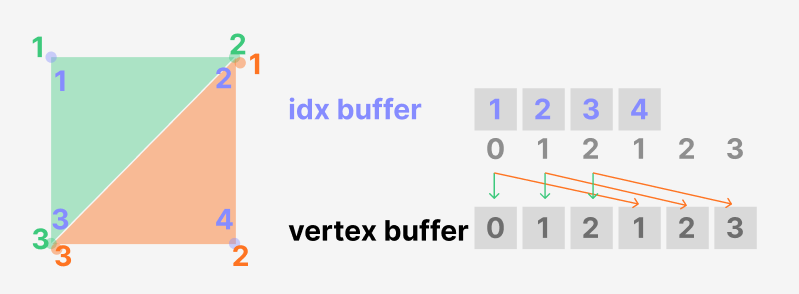
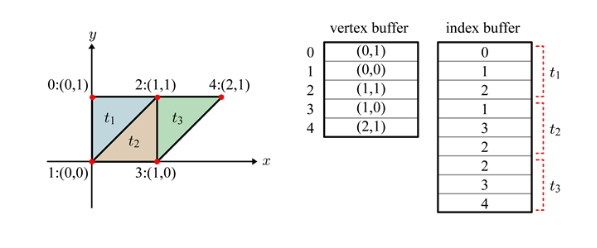
index Buffer
0 ----- 1
| |
2 ----- 3
CW, 시계방향 - 앞면,
CWW 반시계방향 - 뒷면
코드
using System.Collections;
using UnityEngine;


public class Handmade : MonoBehaviour
{


    private struct SAnimClip
    {
        public int totalCnt;
        public int rowCnt;
        public int colCnt;
        public float frameWidth;
        public float frameHeight;

        public SAnimClip(int _totalCnt, int _rowCnt, int _colCnt, float _frameWidth, float _frameHeight)
        {
            totalCnt = _totalCnt;
            rowCnt = _rowCnt;
            colCnt = _colCnt;
            frameWidth = _frameWidth;
            frameHeight = _frameHeight;
        }
    }

    //메쉬만들어보기
    private MeshFilter mf = null;
    private MeshRenderer mr = null;


    private void Awake()
    {

        mf = gameObject.AddComponent<MeshFilter>();
        mr = gameObject.AddComponent < MeshRenderer >();
    }

    private void Start()
    {
        mf.mesh = BuildMesh();
        mf.name = "HandmadeMesh";

        //렌더러 세팅
        Material mat = new Material(Shader.Find("Universal Render Pipeline/Unlit")); //복사 생성 , 재질을 결정짓는게 쉐이더
        mat.name = "M_Handmade";
        mr.material = mat;

        Texture2D tex = Resources.Load<Texture2D>("Textures\\T_AnimSheet");
        mat.mainTexture = tex;

        SetMaterialInvis(mat);
        mr.material = mat;

        SAnimClip clipRun = new SAnimClip(27, 3, 7,0.14166f, 0.1666f);
        StartCoroutine(AnimationCoroutine(clipRun));
    }
    private Mesh BuildMesh()//정점을 가지고있는 Mesh 클래스
    {
        Mesh mesh = new Mesh();

        //idex Vertex
        Vector3[] verticess = new Vector3[]
        {
            new Vector3(-0.5f, 1f, 0f), //왼쪽위에 Left-Top
            new Vector3(0.5f, 1f, 0f),
            new Vector3(-0.5f, 0f, 0f),
            new Vector3(0.5f, 0f, 0f)
        };
        mesh.vertices = verticess;

        //index Buffer
        //0 -- 1
        //|    |
        //2 -- 3
        //CW, 시계방향, CWW 반시계방향
        int[] indices = new int[]
        {
            0,1,2,1,3,2
        };
        mesh.triangles = indices;

        // frame width = 0.13
        // frame height = 0.14

        Vector2[] uvs = new Vector2[]
        {
            new Vector2(0f, 1f),
            new Vector2(0.14166f, 1f),
            new Vector2(0f,1f-0.1666f),
            new Vector2(0.14166f, 1f-0.1666f)
        };

        mesh.uv = uvs;

        Vector3[] normals = new Vector3[]
        {
            new Vector3(0f,0f, -1f),
            new Vector3(0f,0f, -1f),
            new Vector3(0f,0f, -1f),
            new Vector3(0f,0f, -1f),

        };

        mesh.normals = normals;
        return mesh;
    }
    private IEnumerator AnimationCoroutine(SAnimClip _clip)
    {
        float waitingTime = 1f/ _clip.totalCnt;
        WaitForSeconds wfs = new WaitForSeconds(waitingTime);
        Mesh mesh = mf.mesh;

        int frameIdx= 0;
        while (true)
        {
            //total : 7

            float startU = (frameIdx % _clip.colCnt) * _clip.frameWidth;
            float startV = (frameIdx / _clip.colCnt) * _clip.frameHeight;

            mesh.uv = new Vector2[]
            {
                new Vector2(startU, startV),
                new Vector2(startU + _clip.frameWidth, startV),
                new Vector2(startU, startV-_clip.frameHeight),
                new Vector2(startU + _clip.frameWidth, startV-_clip.frameHeight),

            };
            mf.mesh = mesh;//클래스 참조니까

            ++frameIdx;
            if (frameIdx >= _clip.totalCnt)
                frameIdx = 0;

            yield return wfs;
        }

    }
    private void SetMaterialInvis(Material mat)
    {
        mat.SetFloat("_Surface", 1);
        mat.SetFloat("_Blend", 0);
        mat.SetInt("_SrcBlend", (int)UnityEngine.Rendering.BlendMode.SrcAlpha);
        mat.SetInt("_DstBlend", (int)UnityEngine.Rendering.BlendMode.OneMinusSrcAlpha);
        mat.SetInt("_ZWrite", 0);
        mat.DisableKeyword("_ALPHATEST_ON");
        mat.EnableKeyword("_ALPHABLEND_ON");
        mat.DisableKeyword("_ALPHAPREMULTIPLY_ON");
        mat.renderQueue = 3000;
    }
}'유니티' 카테고리의 다른 글
| [유니티] animaiton & asset (0) | 2025.04.30 |
|---|---|
| 유니티로 메이플 만들기 - 에러 (1) | 2025.04.30 |
| [유니티] Texture (5) | 2025.04.18 |
| [유니티] 카메라, 쉐이딩, 조명, 그림자 (1) | 2025.04.18 |
| [유니티] 뱀파이어 서바이벌 클론 코딩 - 1 (0) | 2025.04.15 |


