자판기 만들기
기능
- 아이템 자판기
- 기획자가 자판기를 어디든 둘 수 있고 지역마다 남은갯수 다름
프리팹으로 만들었으며 아이템 +누르면 포션 갯수 생성 가능
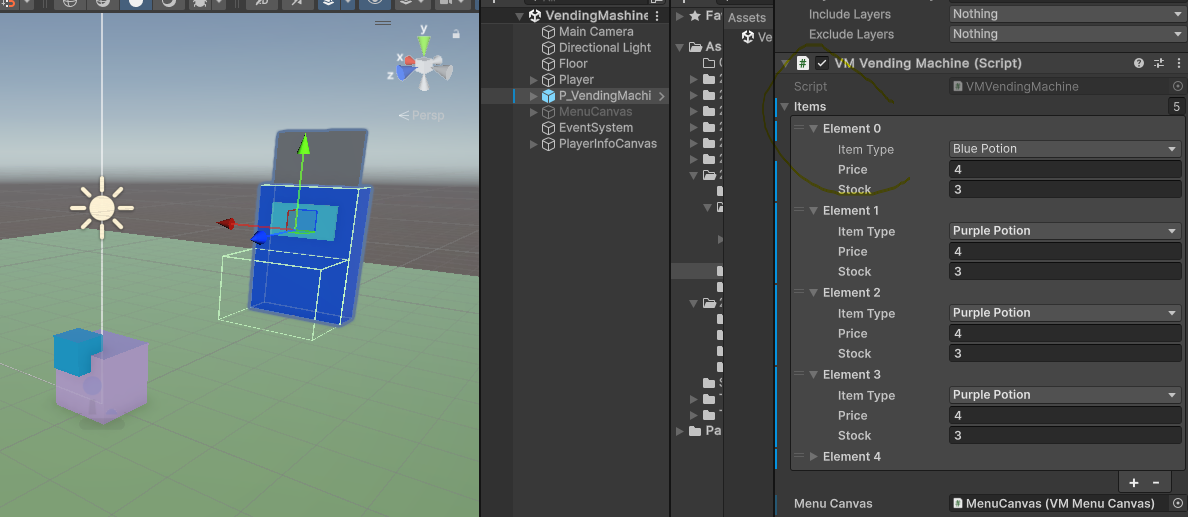
- 플레이어가 자판기 정보(ui) 보고 구매

- 버튼컴포넌트(자판기 상품재고 보여주는 ui) 는 items만큼 정렬이 될 때 정렬이 되는 방식은 아래의 그림과 같음
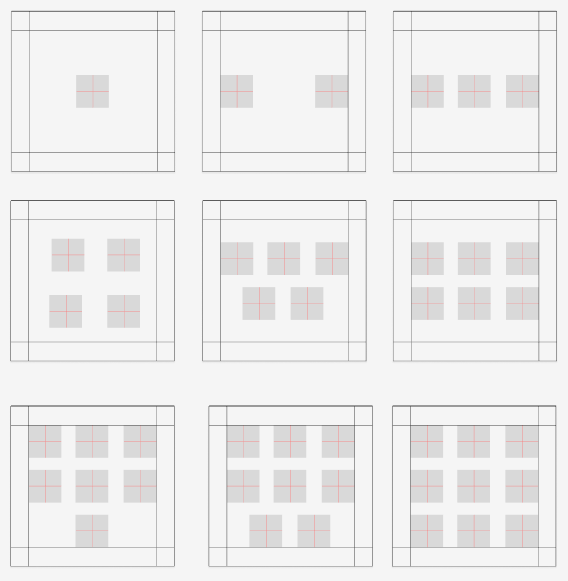
- 현재 4개는.. 안되나 다른건 다됨 쌤한테는 다된다고 말했지만,,, ㅠㅠ
        float backWidth = backTr.sizeDelta.x;
        float backHeight = backTr.sizeDelta.y;

        if (btnPrefab == null)
            btnPrefab =
                Resources.Load<GameObject>("Prefabs\\P_VMButton");
        RectTransform btnTr = btnPrefab.GetComponent<RectTransform>();

        float btnWidth = btnTr.sizeDelta.x;
        float btnHeight = btnTr.sizeDelta.y;

        int rowCntMax = 3;
        int colCntMax = 3;
        float rowOffset =
            (backHeight - (btnHeight * rowCntMax)) / (rowCntMax + 1);
        float colOffset =
            (backWidth - (btnWidth * colCntMax)) / (colCntMax + 1);

        float backWidthHalf = backWidth * 0.5f;
        float backHeightHalf = backHeight * 0.5f;
        float btnWidthHalf = btnWidth * 0.5f;
        float btnHeightHalf = btnHeight * 0.5f;

        // 0 1 2 => 1
        // 3 4 5 => 2
        // 6 7 8 => 3
        int rowCnt = ((_items.Length - 1) / rowCntMax) + 1;
        // 0 1 2 => 1 2 3
        // 3 4 5 => 1 2 3
        // 6 7 8 => 1 2 3
        int colCnt = ((_items.Length - 1) % colCntMax) + 1;
        int colCnt2 = ((_items.Length - 1) / colCntMax) + 1;
        ;

        int itemsLength = _items.Length - 1;
        Debug.Log(" : " + itemsLength);
        int itemsLengthCnt = 0;
        for (int row = 0; row < rowCnt; ++row)
        {

            for (int col = 0; col < colCntMax; ++col)
            {
                if (itemsLengthCnt >= _items.Length) break;

                var colOffset2 =
                                (backWidth - (btnWidth * ((col < colCntMax && row == rowCnt - 1) || itemsLengthCnt==3 ? colCnt : 3))) / ((col + 1 < rowCntMax && row == rowCnt - 1 ? colCnt  : 3) + 1);
                int a = rowCnt - 1;
                float rowOffset2 =
                                (backHeight - (btnHeight * (rowCnt < rowCntMax ? rowCnt : rowCntMax))) / ((rowCnt < rowCntMax ? rowCnt : rowCntMax) + 1);
                // colcnt 를 안에 넣는게 맞는거임
                Vector3 startPos = new Vector3(
                -backWidthHalf + colOffset2 + btnWidthHalf,
                backHeightHalf - rowOffset2 - btnHeightHalf,
                0f);
                Vector3 pos = startPos;
                pos.x += (btnWidth + colOffset2) * (col);
                pos.y -= (btnHeight + rowOffset2) * row;
                GameObject btnGo =
                    Instantiate(
                        btnPrefab,
                        pos,
                        Quaternion.identity,
                        this.transform);
                btnGo.GetComponent<RectTransform>().localPosition = pos;

                VMButton btn = btnGo.GetComponent<VMButton>();
                int colCnt4 = (colCnt2 == col && row == rowCnt - 1 ? col + 1 : colCnt);
                VMVendingMachine.SItem item =
                    _items[itemsLengthCnt];
                //Debug.Log(item.itemType);
                Debug.Log("itemsLengthCnt갯수 : " + itemsLengthCnt);
                Debug.Log("실제index: " + itemsLength);
                btn.Init(
                    OnClickButton,
                    VMVendingMachine.SItem.TypeToString(item.itemType),
                    item.price,
                    item.stock,
                    itemsLengthCnt
                    );

                btnGo.name = item.itemType.ToString();
                btn.SetInteractable(_money >= item.price);//무조건 실행 가능한경우만 들어가도록
                ++itemsLengthCnt;
                if (itemsLengthCnt - 1 == itemsLength) return;

            }
        }
    }
- 구매시 해당 포션 자판기반경내에 랜덤으로 생성

- 습득 효과로 플레이어의 정보값 변경
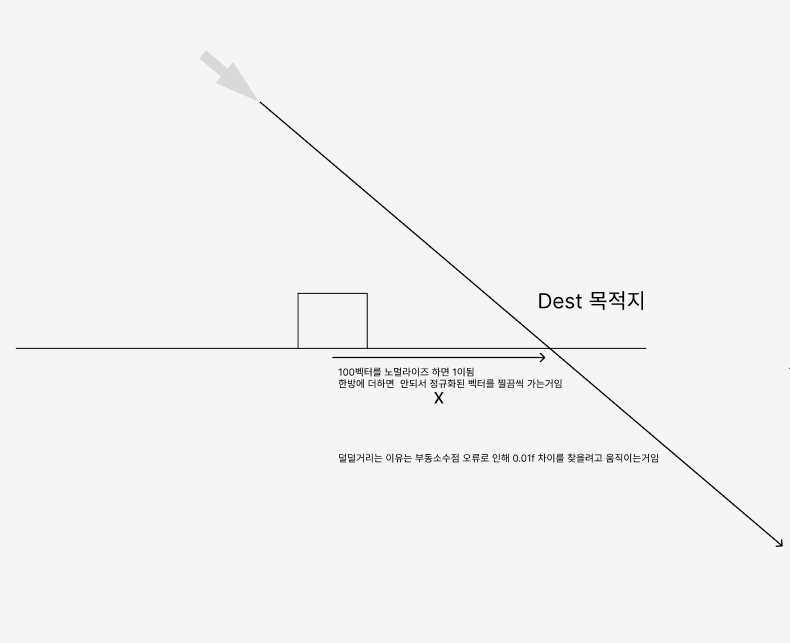
- 플레이어가 마우스 방향으로 회전

공간이 같지 않음
마우스는 스크린좌표
플레이어는 월드 스페이스
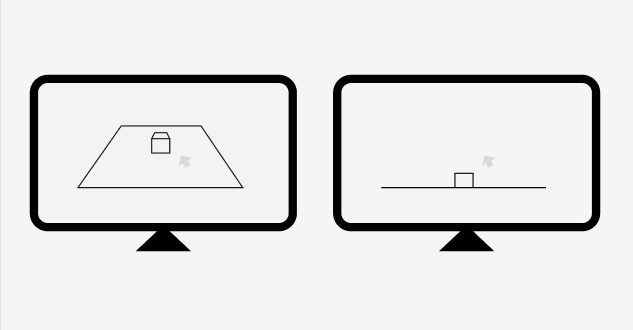
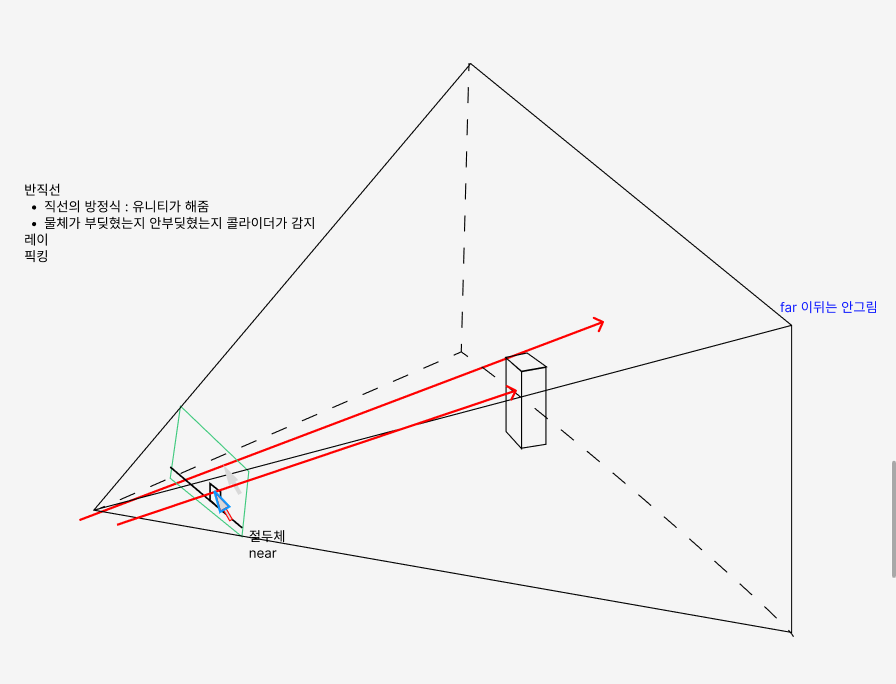
스페이스가 변할려면 행렬을 곱해야함
로컬 좌표에 월드좌표 행렬을 곱하면
월드좌표로감
선생님 퀴즈 아래의 ray는 한 방향만 쏘고있었음 문제점을 찾아서 고치기!
    private void MovingWithMouse()
    {
        if(Input.GetMouseButtonDown(0))
        {
            ////유니티가 파이프라인에 행렬을 곱했던걸 카메라가 가지고 있음 = 이유 카메라가 여러대일 수 도 있기 때문
            //Vector3 mousePos = Input.mousePosition; //마우스 픽셀좌표게는 정수로 되어있음
            //Camera cam = Camera.main;
            //mousePos.z = cam.nearClipPlane;
            //Vector3 screenToWorld =
            //    cam.ScreenToWorldPoint(mousePos);
            //Vector2 dir = cam.transform.forward; //!!!!!!!!!!!!!!!!!!!!!!같은 방향만 쏘게 됨!!!!!!!!!!!!!!!!!!!!!!
            //// 스트럭트 값타입, 외부의걸 얕은 복사를 할려면
            //// ref, out이 필요함함수에서 함수외부의 값을 바꿀 수 있음 ref는 값을 바꿔도 되고 안바꿔도 됨 out은 값을 안바꾸면 안됨
            //RaycastHit hitInfo;
            //if (Physics.Raycast(screenToWorld, dir, out hitInfo))
            //{
            //    //걸렸는지 bool값이 나오는데
            //    //필요한건 좌표임 RaycastHit hit 사용하면됨
            //    Debug.Log(hitInfo.transform.name);
            //}
            //Debug.DrawRay(screenToWorld, dir * 1000f, Color.blue);// 디버그용 확인하기
            }
    }
이부분이 이상했음 카메라방향이 앞인걸 이미 그리고 있는데 우리가 원하는건 방향 벡터임
Vector2 dir = cam.transform.forward;
그러하여 dir 값(목적지)은 목적지 빼기 현재위치인데
마우스를 스크린 월드에 보낸것을 카메라위치를 뺀다면 구할 수 있는 내용이었음!
아래의 코드로 MovingWithMouse가 작동함
            Vector3 mousePos = Input.mousePosition;

            Camera cam = Camera.main;
            mousePos.z = cam.nearClipPlane;
            //Debug.Log("cam.nearClipPlane" + cam.nearClipPlane);
            Vector3 screenToWorld =
                cam.ScreenToWorldPoint(mousePos);
            Vector3 dir = screenToWorld - cam.transform.position;

            RaycastHit hitInfor;
            if (Physics.Raycast(screenToWorld, dir, out hitInfor))
            {
                if (hitInfor.transform.CompareTag("Player")) return;
                moveDest = hitInfor.point;
                LookAtdestination();
                state = Estate.Move;
            }
'유니티' 카테고리의 다른 글
| [유니티] 카메라, 쉐이딩, 조명, 그림자 (1) | 2025.04.18 |
|---|---|
| [유니티] 뱀파이어 서바이벌 클론 코딩 - 1 (0) | 2025.04.15 |
| [유니티] Break out 게임 만들기 -1 (0) | 2025.04.10 |
| [유니티] 카메라 컴포넌트 (0) | 2025.04.09 |
| [유니티] 콜리전, 콜라이더, 트리거, 리지드바디 (0) | 2025.04.07 |


